

Note
Go to the end to download the full example code.
Plot a graph using matplotlib#
This tutorial explains how to plot a graph with data from DPF using matplotlib.
The current DpfPlotter module does not
support graph plots. Instead, use the
matplotlib library to plot graphs with
PyDPF-Core.
There is a large range of graphs you can plot. Here, we showcase:
Result along a path#
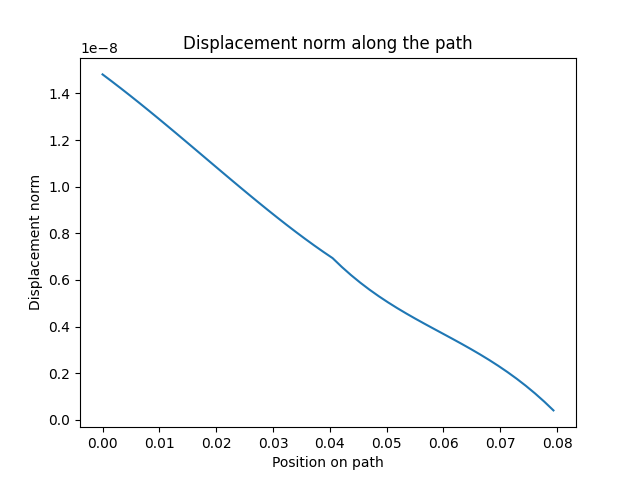
In this section, we plot the norm of the displacement along a custom path
represented by a
Line. We first get the data of interest,
create a custom Line geometry for the path, map the result on the path, and
finally create a 2D graph.
Extract the data#
First, extract the data from a result file.
For this tutorial we use a case available in the
examples module.
import matplotlib.pyplot as plt

import ansys.dpf.core as dpf
from ansys.dpf.core import examples, geometry as geo, operators as ops

result_file_path_1 = examples.find_static_rst()
model_1 = dpf.Model(data_sources=result_file_path_1)
Extract the result of interest — the norm of the displacement field at the last step.
disp_results_1 = model_1.results.displacement.eval()
norm_disp = ops.math.norm_fc(fields_container=disp_results_1).eval()
Define the path#
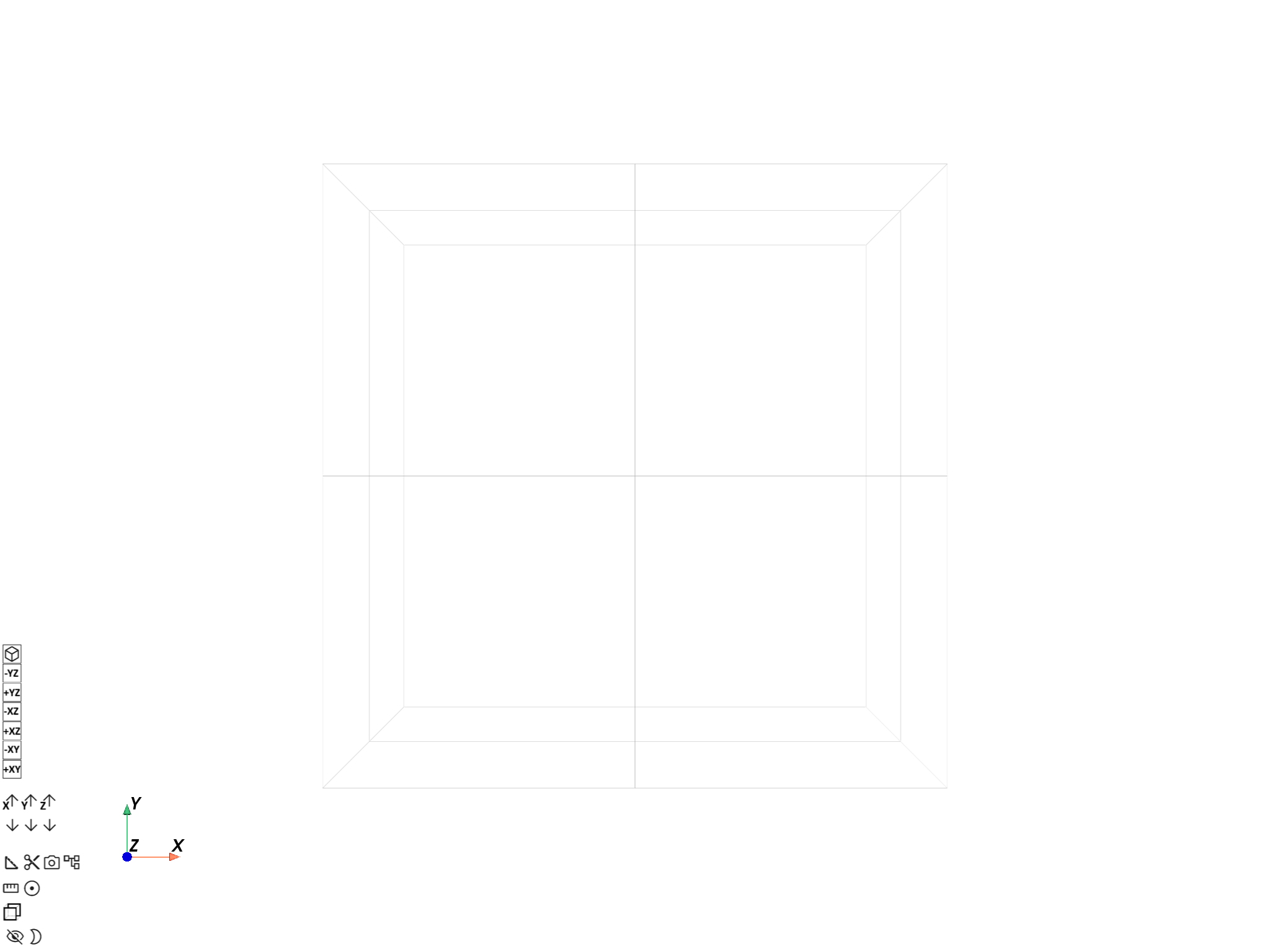
Create a path as a
Line passing through the diagonal of
the mesh.
line_1 = geo.Line(coordinates=[[0.0, 0.06, 0.0], [0.03, 0.03, 0.03]], n_points=50)
line_1.plot(mesh=model_1.metadata.meshed_region)
Map the data on the path#
Map the displacement norm field to the path using the
on_coordinates
mapping operator. This operator interpolates field values at given node coordinates,
using element shape functions.
It takes a FieldsContainer
of data, a 3D vector Field of coordinates to
interpolate at, and an optional
MeshedRegion to use for element
shape functions if the first field in the data does not have an associated meshed
support.
disp_norm_on_path_fc: dpf.FieldsContainer = ops.mapping.on_coordinates(
    fields_container=norm_disp,
    coordinates=line_1.mesh.nodes.coordinates_field,
).eval()
disp_norm_on_path: dpf.Field = disp_norm_on_path_fc[0]
print(disp_norm_on_path)
DPF displacement_1.s Field
  Location: Nodal
  Unit: m
  50 entities
  Data: 1 components and 50 elementary data

  IDs                   data(m)
  ------------          ----------
  1                     1.481537e-08

  2                     1.451810e-08

  3                     1.421439e-08

  ...
Plot the graph#
Plot the norm of the displacement field along the path using matplotlib.
Use the
Line.path property to get the
parametric coordinates of the nodes along the line for the X-axis.
The values in the displacement norm field are in the same order as the parametric
coordinates because the mapping operator orders output data the same as the input
coordinates.
line_coordinates = line_1.path

plt.plot(line_coordinates, disp_norm_on_path.data)
plt.xlabel("Position on path")
plt.ylabel("Displacement norm")
plt.title("Displacement norm along the path")
plt.show()
Transient data#
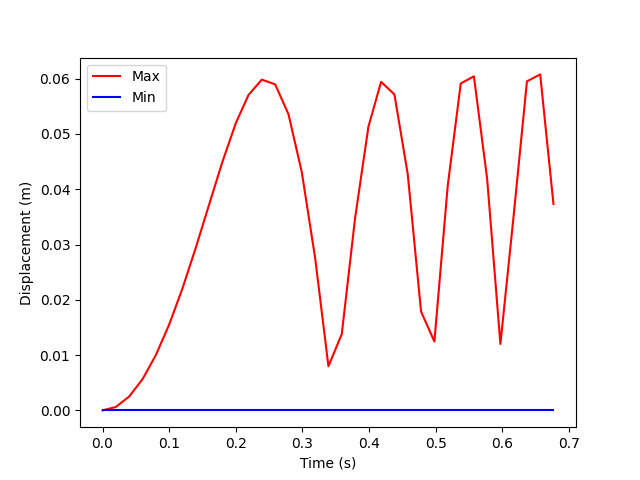
In this section, we plot the minimum and maximum displacement norm over time for a transient analysis. For more information about using PyDPF-Core with a transient analysis, see the Transient analysis examples examples.
We create data for the Y-axis, format the time information for the X-axis, and create a 2D graph using both.
Prepare data#
Load a transient case from the
examples module.
result_file_path_2 = examples.download_transient_result()
model_2 = dpf.Model(data_sources=result_file_path_2)

# Check the model is transient via its TimeFreqSupport
print(model_2.metadata.time_freq_support)
DPF  Time/Freq Support:
  Number of sets: 35
Cumulative     Time (s)       LoadStep       Substep
1              0.000000       1              1
2              0.019975       1              2
3              0.039975       1              3
4              0.059975       1              4
5              0.079975       1              5
6              0.099975       1              6
7              0.119975       1              7
8              0.139975       1              8
9              0.159975       1              9
10             0.179975       1              10
11             0.199975       1              11
12             0.218975       1              12
13             0.238975       1              13
14             0.258975       1              14
15             0.278975       1              15
16             0.298975       1              16
17             0.318975       1              17
18             0.338975       1              18
19             0.358975       1              19
20             0.378975       1              20
21             0.398975       1              21
22             0.417975       1              22
23             0.437975       1              23
24             0.457975       1              24
25             0.477975       1              25
26             0.497975       1              26
27             0.517975       1              27
28             0.537550       1              28
29             0.557253       1              29
30             0.577118       1              30
31             0.597021       1              31
32             0.616946       1              32
33             0.636833       1              33
34             0.656735       1              34
35             0.676628       1              35
Extract the displacement field for every time step.
disp_results_2: dpf.FieldsContainer = model_2.results.displacement.on_all_time_freqs.eval()
Get the minimum and maximum of the norm of the displacement at each time step
using the
min_max_fc operator.
min_max_op = ops.min_max.min_max_fc(fields_container=ops.math.norm_fc(disp_results_2))

max_disp: dpf.Field = min_max_op.outputs.field_max()
print(max_disp)

min_disp: dpf.Field = min_max_op.outputs.field_min()
print(min_disp)
DPF displacement_0.s Field
  Location: Nodal
  Unit: m
  35 entities
  Data: 1 components and 35 elementary data

  IDs                   data(m)
  ------------          ----------
  0                     0.000000e+00

  1                     6.267373e-04

  2                     2.509401e-03

  ...


DPF displacement_0.s Field
  Location: Nodal
  Unit: m
  35 entities
  Data: 1 components and 35 elementary data

  IDs                   data(m)
  ------------          ----------
  0                     0.000000e+00

  1                     0.000000e+00

  2                     0.000000e+00

  ...
Prepare time values#
The time or frequency information associated to DPF objects is stored in
TimeFreqSupport objects.
Use the TimeFreqSupport of a Field with location time_freq to retrieve
the time or frequency values associated to the entities in its scoping.
time_steps_1: dpf.Field = disp_results_2.time_freq_support.time_frequencies
print(time_steps_1)

# Extract the data of the Field as a plain array
time_data = time_steps_1.data
print(time_data)
DPF  Field
  Location: timefrq_sets
  Unit: s
  1 entities
  Data: 1 components and 35 elementary data

  TimeFreq_steps
  IDs                   data(s)
  ------------          ----------
  1                     0.000000e+00
                        1.997500e-02
                        3.997500e-02
                        ...


[0.         0.019975   0.039975   0.059975   0.079975   0.099975
 0.119975   0.139975   0.159975   0.179975   0.199975   0.218975
 0.238975   0.258975   0.278975   0.298975   0.318975   0.338975
 0.358975   0.378975   0.398975   0.417975   0.437975   0.457975
 0.477975   0.497975   0.517975   0.53754972 0.55725277 0.57711786
 0.59702054 0.61694639 0.63683347 0.65673452 0.67662783]
Plot the graph#
Use the unit property of the fields to properly label the axes.
plt.plot(time_data, max_disp.data, "r", label="Max")
plt.plot(time_data, min_disp.data, "b", label="Min")
plt.xlabel(f"Time ({time_steps_1.unit})")
plt.ylabel(f"Displacement ({max_disp.unit})")
plt.legend()
plt.show()
Total running time of the script: (0 minutes 1.823 seconds)