

Note
Go to the end to download the full example code.
Post-processing element erosion (projectile-plate impact)#
This example post-processes element erosion in an LS-DYNA d3plot result of a tungsten-alloy projectile penetrating a steel plate, and plots the surviving mesh deformed by displacement at the final time step.
Both parts use *MAT_PLASTIC_KINEMATIC with a failure strain of 0.8, so elements
are progressively deleted on impact. The simulation uses
*CONTACT_ERODING_SURFACE_TO_SURFACE, which causes LS-DYNA to write a per-step
element deletion flag to d3plot. DPF exposes that flag as the erosion_flag result
(active = 1, eroded = 0). The workflow filters the active elements, extracts the
corresponding sub-mesh, and visualizes the deformed geometry at the final time step
(t ≈ 70 µs).
Note
This example requires DPF 8.0 (ansys-dpf-server-2024-R2) or above. For more information, see Compatibility.
from ansys.dpf import core as dpf
from ansys.dpf.core import examples
Load the LS-DYNA result file#
The dataset contains 16 output states at roughly 5 µs intervals
(units: gram, cm, microsecond). Each state is stored in a separate file
(ieverp = 1), so all 17 paths returned by the download helper must be
present in the same directory for DPF to read the full time history.
DPF Model
------------------------------
Unknown analysis
Unit system: Undefined
Physics Type: Unknown
Available results:
     -  global_kinetic_energy: TimeFreq_steps Global Kinetic Energy
     -  global_internal_energy: TimeFreq_steps Global Internal Energy
     -  global_total_energy: TimeFreq_steps Global Total Energy
     -  global_velocity: TimeFreq_steps Global Velocity
     -  initial_coordinates: Nodal Initial Coordinates
     -  coordinates: Nodal Coordinates
     -  velocity: Nodal Velocity
     -  acceleration: Nodal Acceleration
     -  stress: Elemental Stress
     -  stress_von_mises: Elemental Stress Von Mises
     -  plastic_strain_eqv: Elemental Plastic Strain Eqv
     -  erosion_flag: Elemental Erosion Flag
     -  displacement: Nodal Displacement
------------------------------
DPF  Meshed Region:
  7668 nodes
  5664 elements
  Unit:
  With solid (3D) elements
------------------------------
DPF  Time/Freq Support:
  Number of sets: 16
Cumulative     Frequency ()   LoadStep       Substep
1              0.000000       1              1
2              4.976857       2              1
3              9.953713       3              1
4              14.980842      4              1
5              19.957699      5              1
6              24.984827      6              1
7              29.961683      7              1
8              34.988811      8              1
9              39.965668      9              1
10             44.992794      10             1
11             49.969654      11             1
12             54.996780      12             1
13             59.973637      13             1
14             64.950493      14             1
15             69.977623      15             1
16             70.027893      16             1
Extract the erosion flag at the final time step#
The erosion flag is an elemental result: active elements carry a value of 1, eroded elements carry a value of 0. State 16 corresponds to t ≈ 70 µs, when penetration is complete and erosion is most extensive.
last_step = my_model.metadata.time_freq_support.n_sets
erosion_fc = my_model.results.erosion_flag(time_scoping=[last_step]).eval()
print(erosion_fc)
DPF  Fields Container
  with 1 field(s)
  defined on labels: time

  with:
  - field 0 {time:  16} with Elemental location, 1 components and 5664 entities.
Isolate the non-eroded elements#
Apply a high-pass filter to retain only elements whose flag exceeds 0.5, effectively selecting the active (non-eroded) elements.
active_fc = dpf.operators.filter.field_high_pass_fc(
    fields_container=erosion_fc, threshold=0.5
).eval()

# Retrieve the elemental scoping of the surviving elements
active_elemental_scoping = active_fc[0].scoping
print(active_elemental_scoping)
DPF  Scoping:
  with Elemental location and 5050 entities
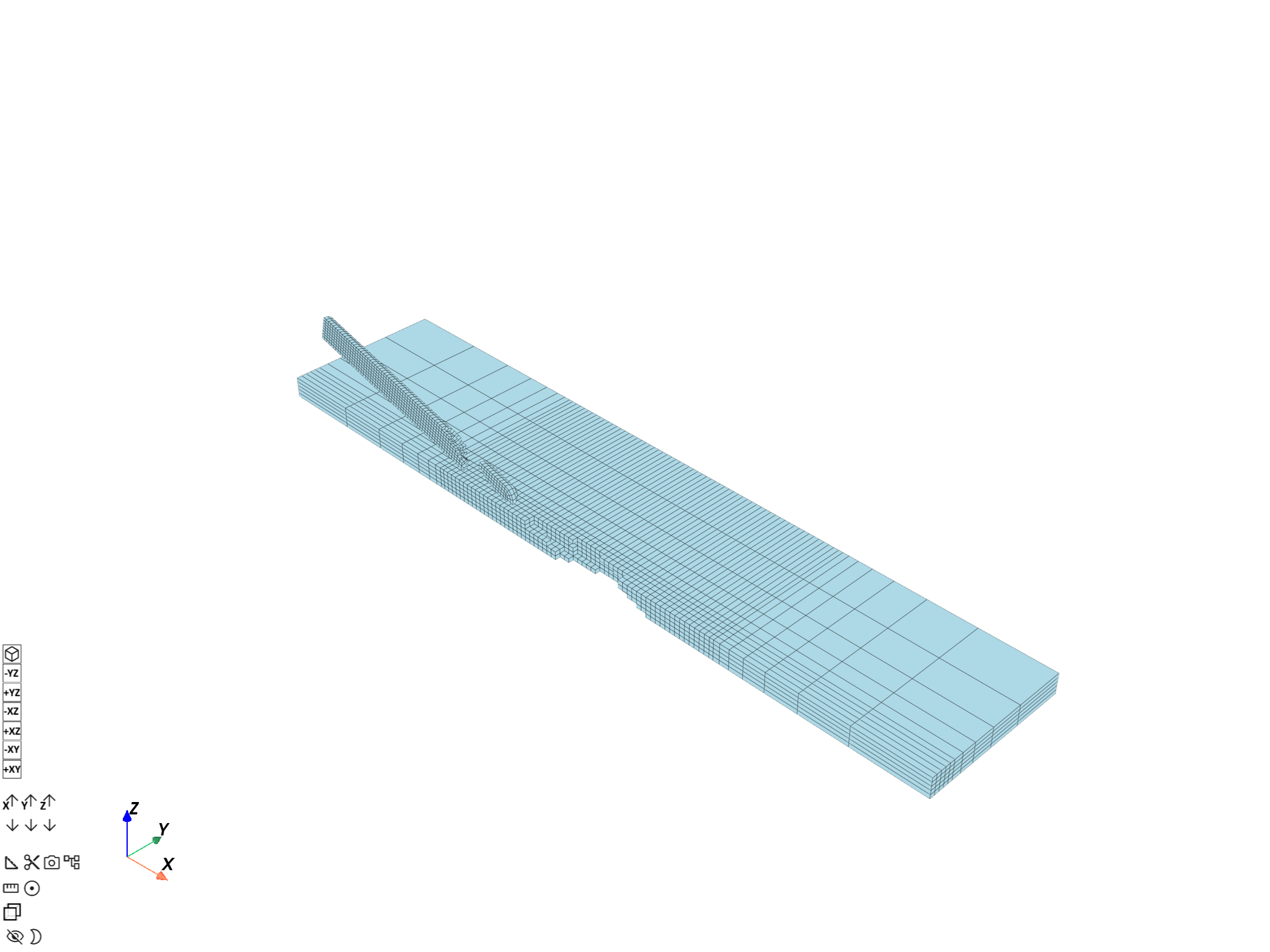
Build the undeformed non-eroded sub-mesh#
Extract the portion of the full mesh that corresponds to the active elements.
full_mesh = my_model.metadata.meshed_region
sub_mesh = dpf.operators.mesh.from_scoping(scoping=active_elemental_scoping, mesh=full_mesh).eval()
sub_mesh.plot(
    text="Undeformed mesh with erosion at the final time step",
    cpos=(1, -1, 1),
)
([], <pyvista.plotting.plotter.Plotter object at 0x00000152B10A5100>)
Rescope displacement to the non-eroded nodes#
Transpose the elemental scoping to the equivalent nodal scoping, then extract the displacement and restrict it to the active nodes.
active_nodal_scoping = dpf.operators.scoping.transpose(
    mesh_scoping=active_elemental_scoping, meshed_region=full_mesh
).eval()

disp_fc = my_model.results.displacement(time_scoping=[last_step]).eval()
active_disp_fc = dpf.operators.scoping.rescope_fc(
    fields_container=disp_fc, mesh_scoping=active_nodal_scoping
).eval()
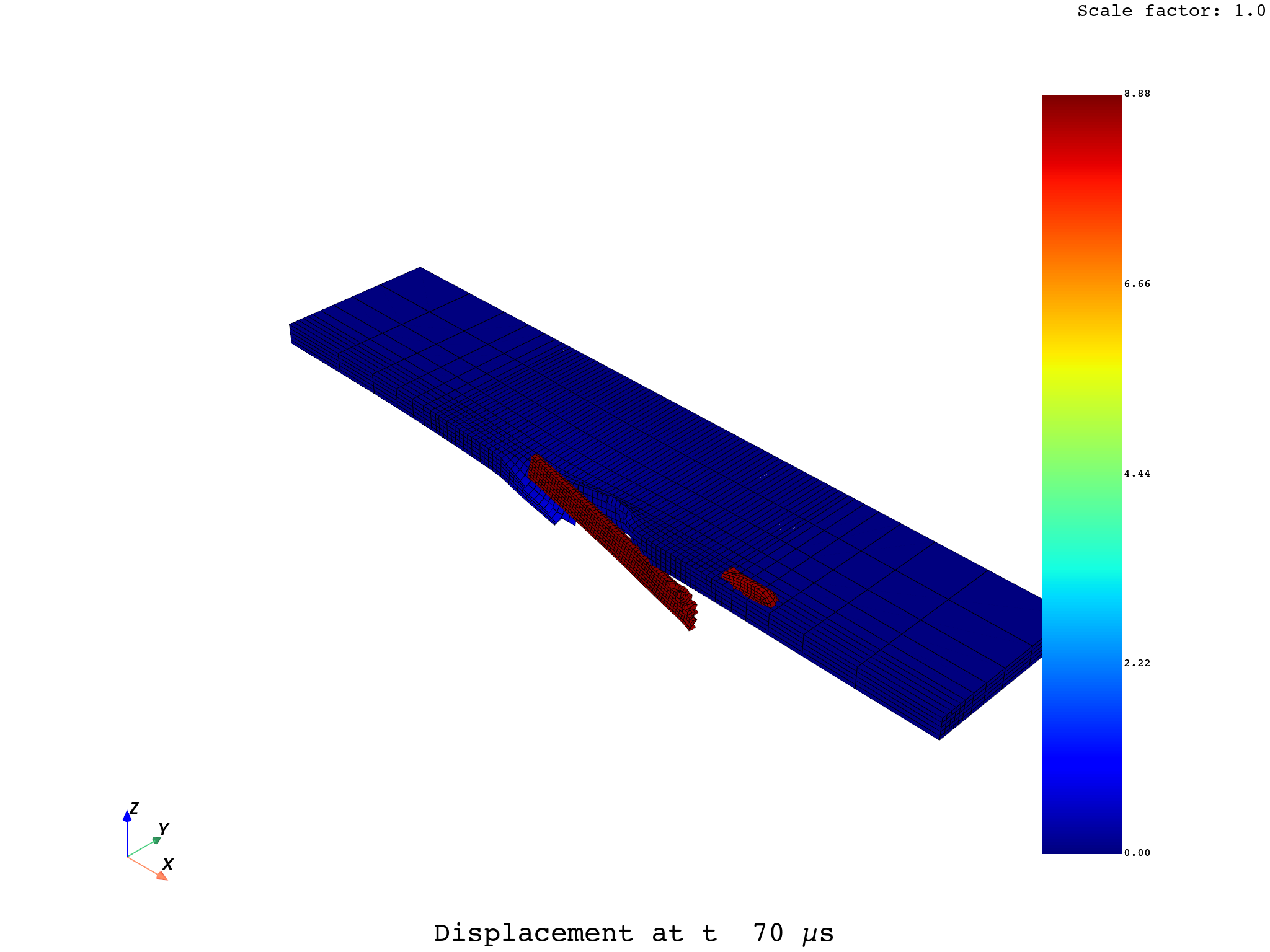
Plot the deformed non-eroded mesh#
Displacement magnitude on the surviving mesh, deformed according to the displacement field. Eroded elements from both the projectile nose and the plate penetration zone are absent from the scene.
active_disp_fc[0].plot(
    meshed_region=sub_mesh,
    deform_by=active_disp_fc[0],
    text="Displacement at t ≈ 70 µs",
    cpos=(1, -1, 1),
)
([], <pyvista.plotting.plotter.Plotter object at 0x00000152B1085A90>)
Total running time of the script: (0 minutes 23.239 seconds)