

Note
Go to the end to download the full example code.
Narrow down data#
MAPDL LS-DYNA FLUENT CFX
This tutorial explains how to scope your results over time and mesh domains.
Understanding the scope#
To begin the workflow setup, you need to establish the scoping, that is
a spatial and/or temporal subset of the simulation data.
The data in DPF is represented by a
Field. Thus, narrowing down your results
means scoping your Field. To do so in DPF, you use the
Scoping object. You can retrieve all
the time steps available for a result, but you can also filter them.
Note
Scoping is important because when DPF-Core returns the Field object,
what Python actually has is a client-side representation of the Field,
not the entirety of the Field itself. The most efficient way of
interacting with result data is to minimize the exchange of data between
Python and DPF, either by using operators or by accessing exclusively the
data that is needed. For more information on the DPF data storage structures
see DPF data structures.
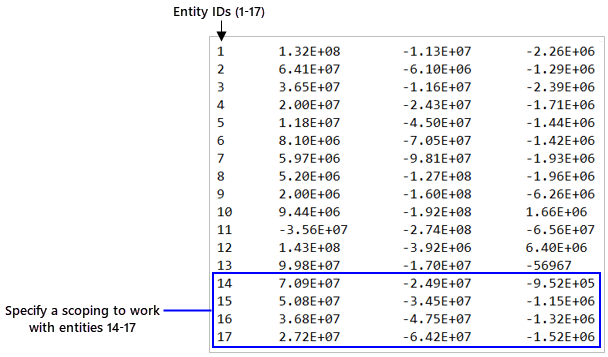
In conclusion, the essence of a scoping is to specify a set of time or mesh entities by defining a range of IDs:
Import the PyDPF-Core modules#
# Import the ``ansys.dpf.core`` module
from ansys.dpf import core as dpf
Create a Scoping from scratch — instantiate the Scoping class#
Create a time Scoping and a mesh Scoping by instantiating the
Scoping object. Use the ids and
location arguments to give the entities ids and location of interest.
Time scoping — use a 'time_freq' location and target time sets by their ids.
time_list_1 = [14, 15, 16, 17]
time_scoping_1 = dpf.Scoping(ids=time_list_1, location=dpf.locations.time_freq)
Mesh scoping — use a nodal location and target nodes by their ids.
nodes_ids_1 = [103, 204, 334, 1802]
mesh_scoping_1 = dpf.Scoping(ids=nodes_ids_1, location=dpf.locations.nodal)
Create a Scoping using the scoping factory modules#
Use the time_freq_scoping_factory
module for a temporal Scoping and the
mesh_scoping_factory module for a
spatial Scoping.
Time scoping — use the
scoping_by_sets()
function to create a Scoping over multiple time sets.
time_list_2 = [14, 15, 16, 17]
time_scoping_2 = dpf.time_freq_scoping_factory.scoping_by_sets(cumulative_sets=time_list_2)
Mesh scoping — use the
nodal_scoping()
function to create a nodal mesh Scoping.
nodes_ids_2 = [103, 204, 334, 1802]
mesh_scoping_2 = dpf.mesh_scoping_factory.nodal_scoping(node_ids=nodes_ids_2)
Define the objects needed to extract Scopings#
Import a result file and create a Model. For this tutorial, use one available
in the examples module. For more information about
how to import your own result file in DPF, see the
Import a result file in DPF tutorial.
# Import the operators and examples module
from ansys.dpf.core import examples, operators as ops

# Define the result file path
result_file_path_1 = examples.download_transient_result()

# Create the DataSources object
ds_1 = dpf.DataSources(result_path=result_file_path_1)

# Create the model
model_1 = dpf.Model(data_sources=ds_1)
Extract the mesh (MeshedRegion), a FieldsContainer with displacement
results, and a single Field.
# Get the MeshedRegion
meshed_region_1 = model_1.metadata.meshed_region

# Get a FieldsContainer with the displacement results
disp_fc = model_1.results.displacement.on_all_time_freqs.eval()

# Get a Field from the FieldsContainer
disp_field = disp_fc[0]
Extract the time Scoping#
Extracting the time Scoping means extracting the scoping of the time
frequencies from the TimeFreqSupport of a DPF object.
From the Model
Access the TimeFreqSupport via the model metadata, then get the time
frequencies Field and extract its scoping.
tfs_1 = model_1.metadata.time_freq_support
t_freqs_1 = tfs_1.time_frequencies
time_scop_1 = t_freqs_1.scoping
print(time_scop_1)
DPF  Scoping:
  with TimeFreq_steps location and 1 entity
From the FieldsContainer
tfs_2 = disp_fc.time_freq_support
t_freqs_2 = tfs_2.time_frequencies
time_scop_2 = t_freqs_2.scoping
print(time_scop_2)
DPF  Scoping:
  with TimeFreq_steps location and 1 entity
From the Field
tfs_3 = disp_field.time_freq_support
t_freqs_3 = tfs_1.time_frequencies
time_scop_3 = t_freqs_3.scoping
print(time_scop_3)
DPF  Scoping:
  with TimeFreq_steps location and 1 entity
Extract the mesh Scoping#
From the MeshedRegion
Use the from_mesh
operator to get the Scoping for the entire mesh. It returns a nodal scoping
by default; use the requested_location argument for an elemental scoping.
mesh_scoping_3 = ops.scoping.from_mesh(mesh=meshed_region_1).eval()
print("Scoping from mesh:", "\n", mesh_scoping_3, "\n")
Scoping from mesh:
 DPF  Scoping:
  with Nodal location and 3820 entities
Use the
MeshedRegion.elements
method and then
Elements.scoping to get an
elemental Scoping.
mesh_scoping_4 = meshed_region_1.elements.scoping
print("Scoping from mesh elements:", "\n", mesh_scoping_4, "\n")
Scoping from mesh elements:
 DPF  Scoping:
  with Elemental location and 789 entities
Use the
MeshedRegion.nodes
method and then
Nodes.scoping to get a nodal
Scoping.
mesh_scoping_5 = meshed_region_1.nodes.scoping
print("Scoping from mesh nodes:", "\n", mesh_scoping_5, "\n")
Scoping from mesh nodes:
 DPF  Scoping:
  with Nodal location and 3820 entities
From the FieldsContainer
Use the
extract_scoping
operator. This operator gets the mesh Scoping for each Field in the
FieldsContainer, returning a ScopingsContainer.
extract_scop_fc_op = ops.utility.extract_scoping(field_or_fields_container=disp_fc)
mesh_scoping_6 = extract_scop_fc_op.outputs.mesh_scoping_as_scopings_container()
print("Scoping from FieldsContainer:", "\n", mesh_scoping_6, "\n")
Scoping from FieldsContainer:
 DPF  Scopings Container
  with 35 scoping(s)
  defined on labels: time

  with:
  - scoping 0 {time:  1, } located on Nodal 3820 entities.
  - scoping 1 {time:  2, } located on Nodal 3820 entities.
  - scoping 2 {time:  3, } located on Nodal 3820 entities.
  - scoping 3 {time:  4, } located on Nodal 3820 entities.
  - scoping 4 {time:  5, } located on Nodal 3820 entities.
  - scoping 5 {time:  6, } located on Nodal 3820 entities.
  - scoping 6 {time:  7, } located on Nodal 3820 entities.
  - scoping 7 {time:  8, } located on Nodal 3820 entities.
  - scoping 8 {time:  9, } located on Nodal 3820 entities.
  - scoping 9 {time:  10, } located on Nodal 3820 entities.
  - scoping 10 {time:  11, } located on Nodal 3820 entities.
  - scoping 11 {time:  12, } located on Nodal 3820 entities.
  - scoping 12 {time:  13, } located on Nodal 3820 entities.
  - scoping 13 {time:  14, } located on Nodal 3820 entities.
  - scoping 14 {time:  15, } located on Nodal 3820 entities.
  - scoping 15 {time:  16, } located on Nodal 3820 entities.
  - scoping 16 {time:  17, } located on Nodal 3820 entities.
  - scoping 17 {time:  18, } located on Nodal 3820 entities.
  - scoping 18 {time:  19, } located on Nodal 3820 entities.
  - scoping 19 {time:  20, } located on Nodal 3820 entities.
  - scoping 20 {time:  21, } located on Nodal 3820 entities.
  - scoping 21 {time:  22, } located on Nodal 3820 entities.
  - scoping 22 {time:  23, } located on Nodal 3820 entities.
  - scoping 23 {time:  24, } located on Nodal 3820 entities.
  - scoping 24 {time:  25, } located on Nodal 3820 entities.
  - scoping 25 {time:  26, } located on Nodal 3820 entities.
  - scoping 26 {time:  27, } located on Nodal 3820 entities.
  - scoping 27 {time:  28, } located on Nodal 3820 entities.
  - scoping 28 {time:  29, } located on Nodal 3820 entities.
  - scoping 29 {time:  30, } located on Nodal 3820 entities.
  - scoping 30 {time:  31, } located on Nodal 3820 entities.
  - scoping 31 {time:  32, } located on Nodal 3820 entities.
  - scoping 32 {time:  33, } located on Nodal 3820 entities.
  - scoping 33 {time:  34, } located on Nodal 3820 entities.
  - scoping 34 {time:  35, } located on Nodal 3820 entities.
From the Field
Use the
extract_scoping
operator or the
Field.scoping method.
mesh_scoping_7 = ops.utility.extract_scoping(field_or_fields_container=disp_field).eval()
print("Scoping from Field (operator):", "\n", mesh_scoping_7, "\n")

mesh_scoping_8 = disp_field.scoping
print("Scoping from Field (method):", "\n", mesh_scoping_8, "\n")
Scoping from Field (operator):
 DPF  Scoping:
  with Nodal location and 3820 entities


Scoping from Field (method):
 DPF  Scoping:
  with Nodal location and 3820 entities
Extract and scope the results#
Apply a Scoping when extracting a result using the
Model.results method or the result
operator inputs. Pass the Scoping objects to the time_scoping and
mesh_scoping arguments.
# Extract and scope using Model.results
disp_model = model_1.results.displacement(
    time_scoping=time_scoping_1, mesh_scoping=mesh_scoping_1
).eval()

# Extract and scope using the result.displacement operator
disp_op = ops.result.displacement(
    data_sources=ds_1, time_scoping=time_scoping_1, mesh_scoping=mesh_scoping_1
).eval()

print("Displacement from Model.results:", "\n", disp_model, "\n")
print("Displacement from result.displacement operator:", "\n", disp_op, "\n")
Displacement from Model.results:
 DPF displacement(s)Fields Container
  with 4 field(s)
  defined on labels: time

  with:
  - field 0 {time:  14} with Nodal location, 3 components and 4 entities.
  - field 1 {time:  15} with Nodal location, 3 components and 4 entities.
  - field 2 {time:  16} with Nodal location, 3 components and 4 entities.
  - field 3 {time:  17} with Nodal location, 3 components and 4 entities.


Displacement from result.displacement operator:
 DPF displacement(s)Fields Container
  with 4 field(s)
  defined on labels: time

  with:
  - field 0 {time:  14} with Nodal location, 3 components and 4 entities.
  - field 1 {time:  15} with Nodal location, 3 components and 4 entities.
  - field 2 {time:  16} with Nodal location, 3 components and 4 entities.
  - field 3 {time:  17} with Nodal location, 3 components and 4 entities.
Extract and rescope the results#
Change the mesh Scoping after result extraction or manipulation using the
rescope operator.
It takes a Field or FieldsContainer and rescopes it to the given
Scoping.
# Extract the results for the entire mesh
disp_all_mesh = model_1.results.displacement.eval()

# Rescope the displacement results to a specific set of nodes
disp_rescope = ops.scoping.rescope(fields=disp_all_mesh, mesh_scoping=mesh_scoping_1).eval()

print("Displacement results for the entire mesh:", "\n", disp_all_mesh, "\n")
print("Displacement results rescoped:", "\n", disp_rescope, "\n")
Displacement results for the entire mesh:
 DPF displacement(s)Fields Container
  with 1 field(s)
  defined on labels: time

  with:
  - field 0 {time:  35} with Nodal location, 3 components and 3820 entities.


Displacement results rescoped:
 DPF displacement(s)Fields Container
  with 1 field(s)
  defined on labels: time

  with:
  - field 0 {time:  35} with Nodal location, 3 components and 4 entities.
Total running time of the script: (0 minutes 0.577 seconds)