

Contributing as a developer#
You can contribute to PyDPF-Core by fixing bugs, adding new features, and improving the codebase. To do so, you must set up the repository on your local machine by following the steps below:
Clone the repository#
Clone the latest version of PyDPF-Core in development mode by running this code:
git clone https://github.com/ansys/pydpf-core
Install for developers#
Installing PyDPF-Core in development mode allows you to perform changes to the code and see the changes reflected in your environment without having to reinstall the library every time you make a change.
To do so, follow the steps below.
Virtual environment#
First, set up a new virtual environment.
Start by navigating to the project’s root directory by running:
cd pydpf-core
Then, create a new virtual environment named .venv to isolate your system’s
Python environment by running:
python -m venv .venv
Finally, activate this environment by running:
.venv\Scripts\activate.bat
.venv\Scripts\Activate.ps1
source .venv/bin/activate
Development mode#
Now, install PyDPF-Core in editable mode by running:
python -m pip install --editable .
Verify the installation by checking the version of the library:
from ansys.dpf.core import __version__


print(f"PyDPF-Core version is {__version__}")
>>> PyDPF-Core version is 0.15.1.dev0
Install Tox#
Once the project is installed, you can install Tox. This is a cross-platform automation tool. The main advantage of Tox is that it eases routine tasks like project testing, documentation generation, and wheel building in separate and isolated Python virtual environments.
To install Tox, run:
python -m pip install tox tox-uv
Finally, verify the installation by listing all the different environments (automation rules) for PyDPF-Core:
python -m tox list
Default Tox environments
Environment |
Description |
|---|---|
pretest |
Environment to organize test files prior to testing |
test-api |
Environment for running api tests |
test-documentation |
Environment for running documentation tests |
test-launcher |
Environment for running launcher tests |
test-server |
Environment for running server tests |
test-local_server |
Environment for running local server tests |
test-multi_server |
Environment for running multiple server tests |
test-api_entry |
Environment for running api entry tests |
test-custom_type_field |
Environment for running custom-type field tests |
test-operators |
Environment for running operators tests |
test-workflow |
Environment for running workflow tests |
test-remote_workflow |
Environment for running remote workflow tests |
test-remote_operator |
Environment for running remote operator tests |
test-service |
Environment for running service tests |
test-server_errors |
Environment for running server error wrapping tests |
posttest |
Environment to revert test files to original state after testing |
kill-servers |
Environment for clearing running servers |
build-wheel |
Environment for custom build of package wheels |
covreport |
Environment for combining coverage reports |
doc-clean |
Environment for cleaning previously generated html documentation |
doc-links |
Environment for verifying the integrity of external links within the documentation |
doc-html |
Environment for html documentation generation |
Code style#
PyDPF-Core follows the PyAnsys coding style guidelines to ensure consistent, readable, and maintainable code across the project. All contributors must adhere to these standards.
Code formatting tools#
PyDPF-Core uses Ruff as its primary code formatting and linting tool. Ruff is a fast Python linter and formatter that combines the functionality of multiple tools (like Black, isort, and Flake8) into a single package.
The project configuration is defined in the pyproject.toml file with the
following key settings:
Line length: 100 characters maximum
Quote style: Double quotes
Import sorting: Using isort rules with Ansys as a known first-party package
Docstring convention: NumPy style
Pre-commit hooks#
PyDPF-Core uses pre-commit hooks to automatically check and format code before each commit. These hooks ensure that code styling rules are applied consistently across all contributions.
To set up pre-commit hooks, install pre-commit and activate it:
python -m pip install pre-commit
pre-commit install
Once installed, the hooks will run automatically on git commit. The following
checks are performed:
Ruff: Linting and formatting
Codespell: Spell checking
License headers: Ensures all files have proper copyright headers
Merge conflicts: Detects merge conflict markers
Debug statements: Identifies leftover debug code
You can also run pre-commit manually on all files:
pre-commit run --all-files
Manual code formatting#
If you prefer to format code manually without committing, you can run Ruff directly:
# Format code
python -m ruff format .

# Check and fix linting issues
python -m ruff check --fix .

# Check without fixing
python -m ruff check .
PEP 8 compliance#
PyDPF-Core follows PEP 8 style guidelines, which are the official Python style guide. Ruff enforces most PEP 8 rules automatically.
Key PEP 8 principles include:
Use 4 spaces for indentation (never tabs)
Limit line length to 100 characters (project-specific)
Use meaningful variable and function names
Follow naming conventions:
lowercase_with_underscoresfor functions and variablesCapitalizedWordsfor class namesUPPERCASE_WITH_UNDERSCORESfor constants
Add appropriate whitespace around operators and after commas
Use docstrings for all public modules, functions, classes, and methods
For complete details on PEP 8 and formatting best practices, refer to:
Docstring style#
PyDPF-Core uses the NumPy docstring convention for all documentation strings. This convention is enforced by Ruff’s pydocstyle rules.
Example of a properly formatted function docstring:
def calculate_stress(field, mesh, location="Nodal"):
    """Calculate stress values at specified locations.

    Parameters
    ----------
    field : Field
        Input field containing stress data.
    mesh : MeshedRegion
        Mesh region for the calculation.
    location : str, optional
        Location where stress is calculated. Default is ``"Nodal"``.

    Returns
    -------
    Field
        Calculated stress field.

    Examples
    --------
    >>> from ansys.dpf import core as dpf
    >>> stress_field = calculate_stress(field, mesh)

    """
    # Implementation here
    pass
Type hints#
While not strictly enforced, using type hints is encouraged for better code clarity and IDE support. PyDPF-Core uses type hints extensively in its public API.
Example with type hints:
from typing import Optional
from ansys.dpf.core import Field, MeshedRegion

def process_field(
    field: Field,
    mesh: Optional[MeshedRegion] = None
) -> Field:
    """Process a field with optional mesh support."""
    # Implementation here
    pass
Continuous integration checks#
All pull requests are automatically checked for code style compliance using GitHub Actions. Your code must pass these checks before it can be merged:
Ruff formatting and linting
Codespell checks
License header verification
Test suite execution
If the CI checks fail, review the error messages and apply the necessary fixes before requesting a review.
Run the tests#
Once you have made your changes, you can run the tests to verify that your modifications did not break the project.
PyDPF-Core tests are organized into groups and require additional steps during execution to ensure tests run as expected without errors, therefore, PyDPF-Core tox configuration supports different markers to account for this. These markers are associated with a dedicated Tox environment.
To also allow flexibility required during development, a specific DPF Server installation can also be used as explained in the subsections that follow.
Unified DPF Server installation or specific DPF Server installation using ANSYS_DPF_PATH environment variable#
These two installation DPF Server installation methods i.e. (unified or via ANSYS_DPF_PATH) require no special handling. Individual test groups can be simply run with the following commands:
Testing individual groups
Environment |
Command |
|---|---|
test-api |
python -m tox -e pretest,test-api ,posttest,kill-servers |
test-documentation |
python -m tox -e pretest,test-documentation ,posttest,kill-servers |
test-launcher |
python -m tox -e pretest,test-launcher ,posttest,kill-servers |
test-server |
python -m tox -e pretest,test-server ,posttest,kill-servers |
test-local_server |
python -m tox -e pretest,test-local_server ,posttest,kill-servers |
test-multi_server |
python -m tox -e pretest,test-multi_server ,posttest,kill-servers |
test-api_entry |
python -m tox -e pretest,test-api_entry ,posttest,kill-servers |
test-custom_type_field |
python -m tox -e pretest,test-custom_type_field ,posttest,kill-servers |
test-operators |
python -m tox -e pretest,test-operators ,posttest,kill-servers |
test-workflow |
python -m tox -e pretest,test-workflow ,posttest,kill-servers |
test-remote_workflow |
python -m tox -e pretest,test-remote_workflow ,posttest,kill-servers |
test-remote_operator |
python -m tox -e pretest,test-remote_operator ,posttest,kill-servers |
test-service |
python -m tox -e pretest,test-service ,posttest,kill-servers |
test-server_errors |
python -m tox -e pretest,test-server_errors ,posttest,kill-servers |
Multiple tests can be run in different ways by specifying appropriate tox command:
Testing more than one group sequentially
Command |
Description |
|---|---|
python -m tox |
Run all test groups sequentially |
python -m tox -e pretest,test-api,test-launcher,posttest,kill-servers |
run specific selection of tests sequentially |
To save testing time, the --parallel flag can be passed when running multiple environments at once.
Some test groups are incompatible for parallel runs by nature of their configuration. Some labels have
been added to the tox configuration for compatible tests to make running them easier.
The following commands are thus recommended when you wish to take advantage of parallel runs.
Testing more than one group in parallel
Command |
Description |
|---|---|
python -m tox -m localparalleltests –parallel |
Run all compatible test groups in parallel |
python -m tox -e othertests |
Run incompatible test groups sequentially |
python -m pretest,test-api,test-launcher,posttest,kill-servers –parallel |
Run specific selection of tests in parallel |
Standalone DPF Server installation#
Standalone DPF Server is usually installed in editable mode.
Accordingly, tox commands need to be adjusted for installation of standalone DPF Server in the isolated python environments
tox creates to run these tests in. This is achieved by adding -x testenv.deps+="-e <path/to/dpf/standalone>"
to any of the previous tox commands.
For example, to run compatible parallel tests while using a Standalone DPF Server whose path is ansys_dpf_server_lin_v2025.1.pre0, simply run:
python -m tox -m localparalleltests --parallel -x testenv.deps+="-e ansys_dpf_server_lin_v2025.1.pre0"
Warning
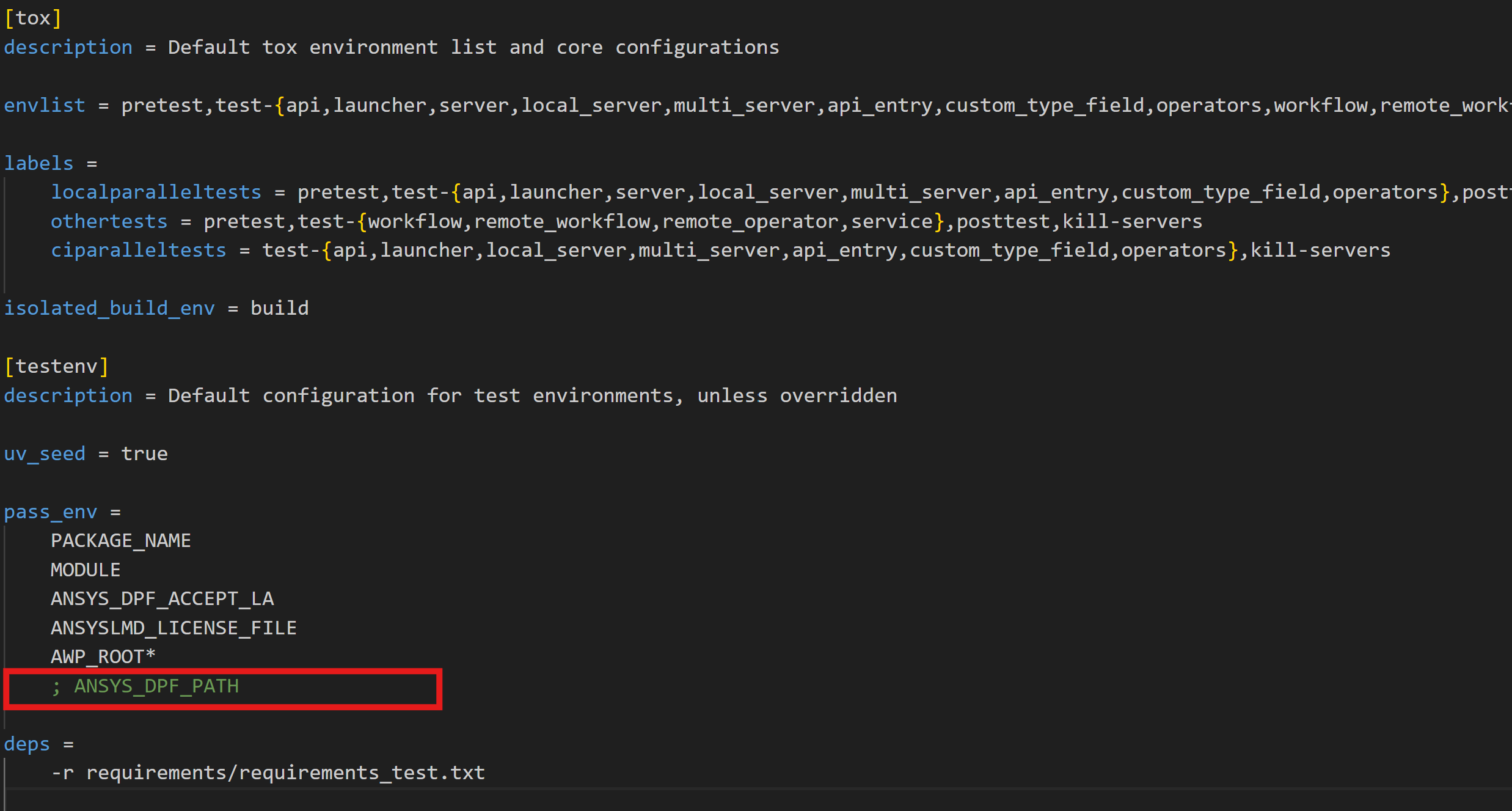
When the ANSYS_DPF_PATH environment variable is set, the server pointed to takes precedence over any other DPF Server installation method. Therefore, a standalone DPF Server installed in editable mode, in the presence of ANSYS_DPF_PATH environment variable, will be ignored.
With tox, a simple workaround is not setting this environment variable at the operating system level but passing it explicitly only when
required. This is achived by adding -x testenv.setenv+="ANSYS_DPF_PATH=<path/to/valid/DPF/Server/installation>" to any tox command.
Alternatively, when set at the operating system level, commenting out the line where this environment variable is passed in the tox configuration file will ensure that it is ignored within the tox environments.
Testing on Linux via WSL#
Some system dependencies required for VTK to run properly might be missing when running tests on linux via WSL (or even linux in general).
The identified workaround for this is to install the OSMesa wheel variant that leverages offscreen rendering with OSMesa.
This wheel is being built for both Linux and Windows at this time and bundles all of the necessary libraries into the wheel. This is
achieved by adding -x testenv.commands_pre="uv pip install --index-url https://wheels.vtk.org vtk-osmesa==<version>"
For example, to run all tests sequentially on linux, while using a Standalone DPF Server whose path is ansys_dpf_server_lin_v2025.1.pre0, simply run:
python -m tox --parallel -x testenv.deps+="-e ansys_dpf_server_lin_v2025.1.pre0" -x testenv.commands_pre="uv pip install --index-url https://wheels.vtk.org vtk-osmesa==9.2.20230527.dev0"